Explore Control Center
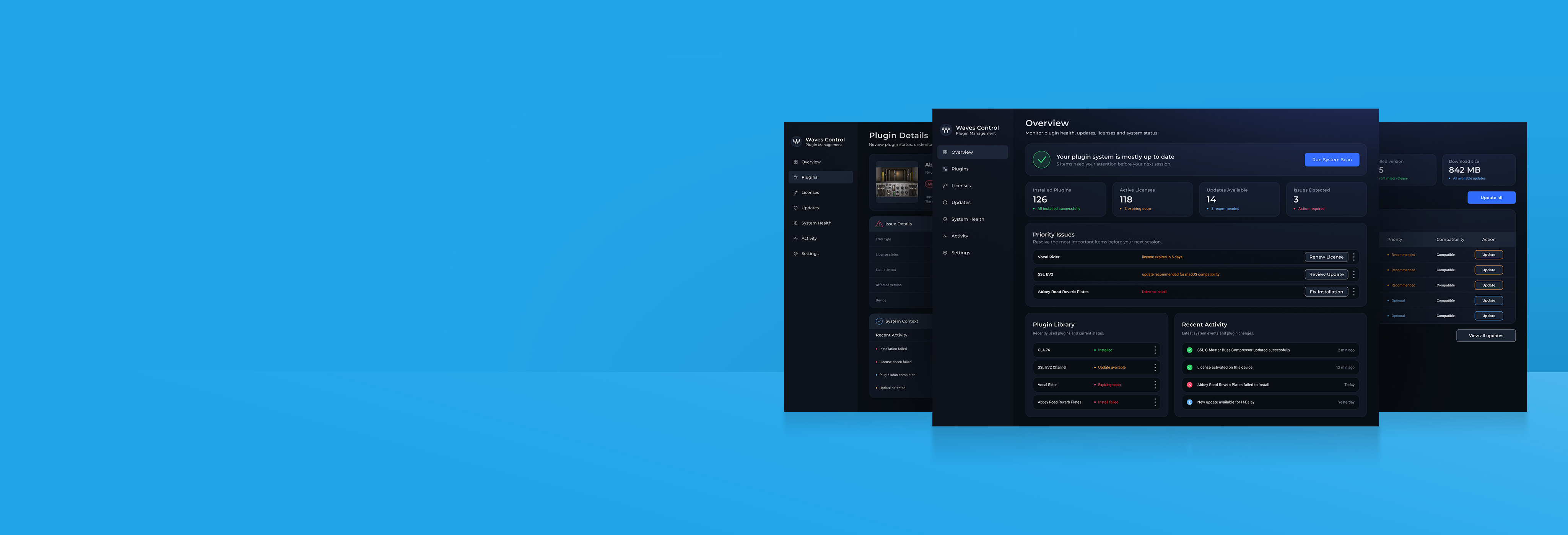
Explore a central workspace for plugin health, licenses, and updates. Click through the dashboard to see how system information leads to focused actions.
Problem
Plugin libraries, licenses, updates, and system health can become difficult to track across large production environments.
Product goal
Create one clear dashboard that helps audio professionals understand plugin status, prioritize issues, and take action before sessions are affected.
Core users
Mixing and mastering engineers who manage large plugin libraries across active client projects and demanding production sessions.
Product value
Control Center brings plugin status, license issues, updates, and system-health information into one actionable workspace.
Information architecture
To make the system easier to understand, the product was divided into clear functional areas. Each area supports a specific user need, from checking overall system health to managing plugins, licenses, updates, and recent activity.
Overview dashboard
Monitor plugin health, license status, updates, and system alerts from one central view.
Plugin library
Search, filter, and manage plugins across large production environments.
Licenses
Review active, expired, or missing licenses.
Updates
Check available updates before installation.
System health
Identify compatibility issues, failed installs, and technical warnings.
Activity
View recent changes, installs, scans, and system events.
Plugin details
Open a focused view with version, status, issue context, and available actions.
Issue resolution
Guide users toward the right next step and confirm when the issue is resolved.
Settings
Manage preferences, install paths, scan behavior, and system configuration.
Eight tasks, one control center
Pick a task to see its flow, from the first step to the result.
Design system
A dark dashboard system: Montserrat for titles and interface text, structured surfaces, and status colors for health, warnings, errors and information.
View design system Hide design system
Color system
A dark dashboard palette keeps technical system information focused, while clear status colors help users quickly understand plugin health, license issues, updates, and system alerts.
Typography
Montserrat carries titles, body text and labels. Roboto is used for captions.
Key UX decisions
Four choices shaped the dashboard. These are design hypotheses to validate with audio professionals.
Priority issues first
Instead of: an overview of equally weighted statistics.
Why: Before a session, the useful question is what might stop the setup from working. A short, prioritized issue list gives the user a place to start.
One table for plugin status
Instead of: separate views for versions, licenses and installation status.
Why: The user needs to know whether a particular plugin is ready to use. Keeping its status together reduces the need to assemble an answer across screens.
Explain, then repair
Instead of: a generic error and a single Fix button.
Why: Changing a studio setup can feel risky. Naming the issue, the repair options and the expected effect helps the user decide what to do.
Warn before a session breaks
Instead of: a neutral confirmation before a disruptive action.
Why: Updates and license changes can affect availability. The interface should explain that consequence before the user commits, especially during active work.
Outcome & next steps
One dashboard brings plugin maintenance together and puts the issues needing attention first.
Waves Control Center is a self-initiated concept, not a launched product or an official redesign of Waves Central. I designed the information architecture, UX/UI, repair flows and design system, using ChatGPT and Claude during development. It has not been tested with users.
I would first test whether audio professionals prioritize the same issues as the overview, and whether they understand the repair options. If implemented, useful measures would include time to an issue-free setup, issues resolved from the overview and repairs completed on the first attempt.